> For the complete documentation index, see [llms.txt](https://specs.govstack.global/llms.txt). Markdown versions of documentation pages are available by appending `.md` to page URLs; this page is available as [Markdown](https://specs.govstack.global/service-patterns/3.-step-patterns/task-list.md).
# Task list
Use the task list to help users understand the tasks required to complete in the service and their progress.
This pattern supports users to:
* see the full scope of questions and tasks required to complete,
* understand what has been completed and what remains,
* return to an in-progress service without losing context.
#### When to use this step
Use this step for services that involve multiple tasks, steps, or pages, especially where users may need to pause and return later.
#### When not to use
Do not use this pattern if the service can be completed in a single short linear flow.
## How it works
### What to include
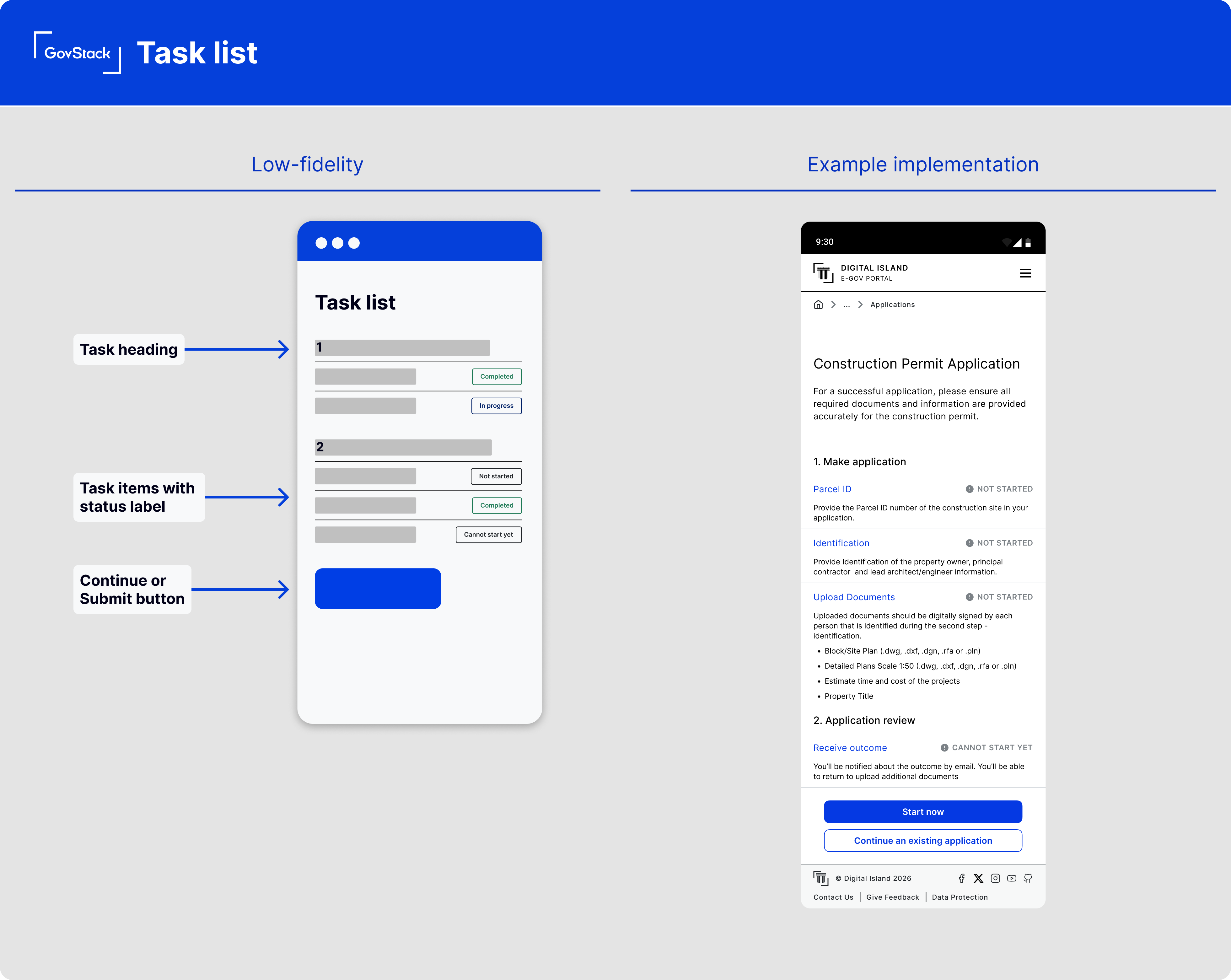
**Task heading**
Each task must have a clear, descriptive heading.
Group related tasks together and use clear section headings to explain what is involved or required. Avoid internal or technical language.
**Task items**
If a group contains sub-tasks, list them with descriptive labels or hyperlink and a status for each.
Each sub-task must:
* describe the action the user needs to take,
* be short and specific,
* remain consistent across the service journey.
**Status labels**
Show a status label for each task (for example, not started, in progress, completed) to make progress visible.
Labels should be short, specific, and consistent across the service.
**Hint text (optional)**
Use hint text sparingly to give more details about the task, explain what information will be asked, why the task is needed, or the level of time or effort required.\
Do not repeat what is already obvious from the task label.
**Primary call to action**
Include a clear action to submit, continue, or confirm the service once required tasks are complete.
### Interaction and UI behaviour
**Show progress though tasks**
Make progress clear as tasks are completed. Use written labels and visual indicators together. Do not rely solely on colour, icons, progress bars, or percentages.
**Maintain a sense of hierarchy**
If tasks must be completed in a specific order, make this clear through layout and sequencing. Visually group or nest related tasks where appropriate.
Prevent access to later tasks only when it is necessary for data integrity or policy reasons, and clearly explain why.
**Validation and completion rules**
Required tasks must be clearly indicated and optional tasks should be explicitly labelled as optional.
Users should only be blocked from submission if required tasks are incomplete.
**Errors**
Validation errors should appear at the task level where possible, not only within individual questions
**Save and return**
For long or complex services, allow users to save progress and return later. On return, take users to the task list and restore accurate task statuses.
***
### Security and privacy considerations:
* Labels should describe the activity, not reveal personal or sensitive data.
* If task completion depends on sensitive data, ensure status labels do not disclose details.
* Save-and-return must protect partially completed data appropriately.
---
# Agent Instructions
This documentation is published with GitBook. GitBook is the documentation platform designed so that both humans and AI agents can read, navigate, and reason over technical content effectively. Learn more at gitbook.com.
## Querying This Documentation
If you need additional information that is not directly available in this page, you can query the documentation dynamically by asking a question.
Perform an HTTP GET request on the current page URL with the `ask` query parameter, and the optional `goal` query parameter:
```
GET https://specs.govstack.global/service-patterns/3.-step-patterns/task-list.md?ask=&goal=
```
`ask` is the immediate question: it should be specific, self-contained, and written in natural language.
`goal` is optional and describes the broader end goal you are ultimately trying to accomplish on behalf of the user. GitBook uses it to tailor the answer towards what is most useful for that goal.
The response will contain a direct answer to the question and relevant excerpts and sources from the documentation.
Use this mechanism when the answer is not explicitly present in the current page, you need clarification or additional context, or you want to retrieve related documentation sections.