> For the complete documentation index, see [llms.txt](https://specs.govstack.global/llms.txt). Markdown versions of documentation pages are available by appending `.md` to page URLs; this page is available as [Markdown](https://specs.govstack.global/service-patterns/3.-step-patterns/service-sheet.md).
# Service sheet
Help users check if they are ready to start a service.
Users may arrive from a service catalogue, chat, search, posters, or referrals
Use this step at the start of a service which involves the user inputting information in order to get something. For example, at the start of an application form.
## How it works
### Content to include
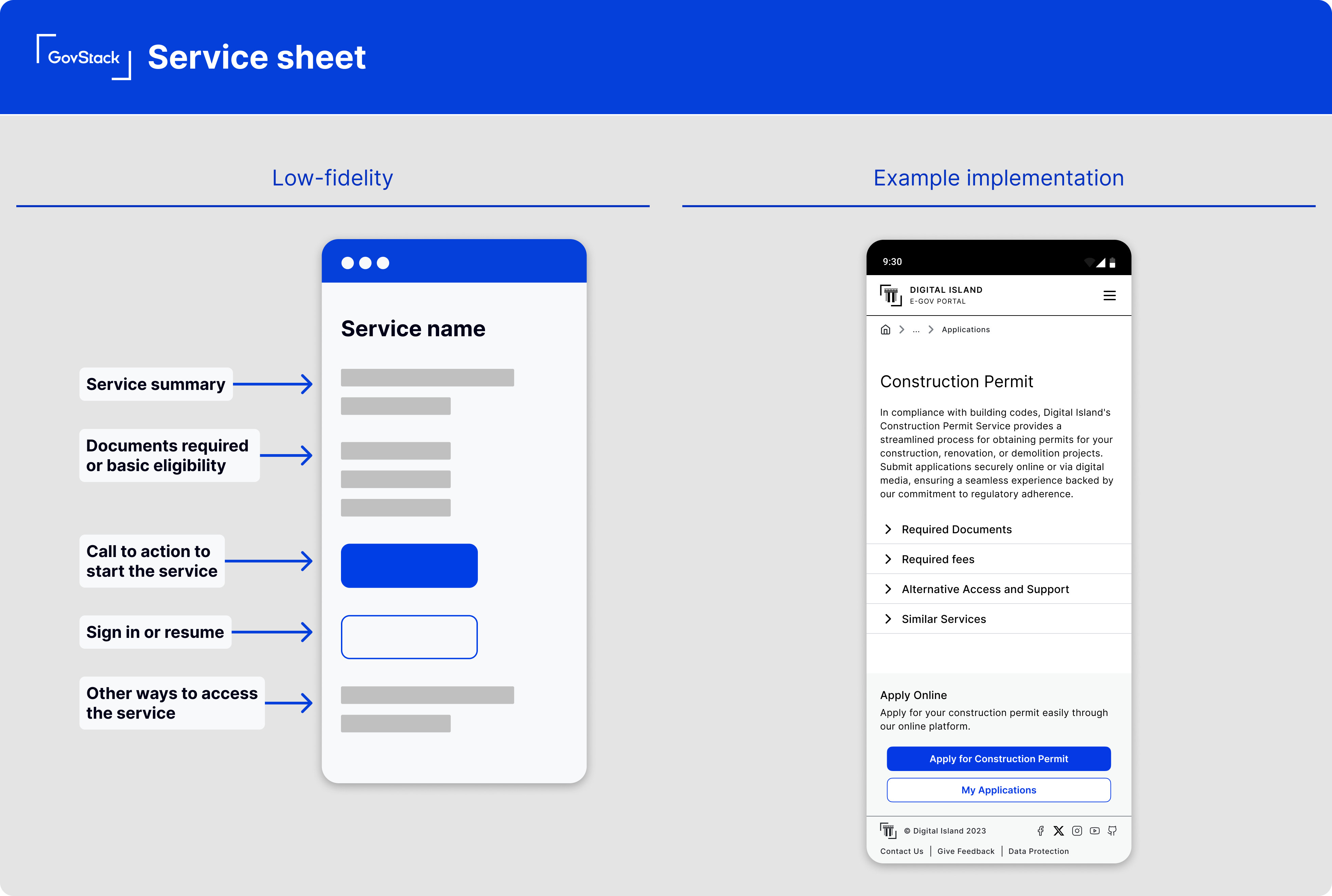
**Service name**
Help people understand what the service is about and if they need to use it.
**Documents and any fees required**
Include a brief introduction to the service and list details users need to know such as:
* about the service,
* what will happen,
* what users will get or
* how much it'll cost.
To keep the content concise, do not include details about anything that would be obvious to users.
**A call-to-action**
There should be a clear call to action button to start the service, usually “Start now”. You should also include a link to “sign in” or “continue journey” if the user is able to continue an existing journey.
**Other ways to access the service**
Provide support for users who cannot access the service online such as by phone, text relay, in-person or other channels.
## Variants
### **Service poster (offline)**
A physical or static version of the service sheet used in offline spaces.
Key differences
* much shorter content
* no interaction\
must work at a distance or glance
**Additional guidance**
* include a clear next step (QR code, URL, phone number, location)
* include official branding or trust signals
* always offer at least one non-digital access route
---
# Agent Instructions
This documentation is published with GitBook. GitBook is the documentation platform designed so that both humans and AI agents can read, navigate, and reason over technical content effectively. Learn more at gitbook.com.
## Querying This Documentation
If you need additional information that is not directly available in this page, you can query the documentation dynamically by asking a question.
Perform an HTTP GET request on the current page URL with the `ask` query parameter, and the optional `goal` query parameter:
```
GET https://specs.govstack.global/service-patterns/3.-step-patterns/service-sheet.md?ask=&goal=
```
`ask` is the immediate question: it should be specific, self-contained, and written in natural language.
`goal` is optional and describes the broader end goal you are ultimately trying to accomplish on behalf of the user. GitBook uses it to tailor the answer towards what is most useful for that goal.
The response will contain a direct answer to the question and relevant excerpts and sources from the documentation.
Use this mechanism when the answer is not explicitly present in the current page, you need clarification or additional context, or you want to retrieve related documentation sections.