> For the complete documentation index, see [llms.txt](https://specs.govstack.global/llms.txt). Markdown versions of documentation pages are available by appending `.md` to page URLs; this page is available as [Markdown](https://specs.govstack.global/service-patterns/3.-step-patterns/ask-for-feedback.md).
# Ask for feedback
Enable users to give feedback, report issues, share observations, or suggest service improvements, without interrupting their progress.
You can collect feedback by prompting users at different points of the service or at the end.
**Some options to collect feedback include:**
* feedback form at the end of the journey
* feedback prompt during the service journey
* satisfaction rating at the end of a service
**Do not use feedback options:**
* for formal research, detailed surveys, or when issue resolution is required
* as a substitute for support, complaints, or help channels.
***
## Feedback form
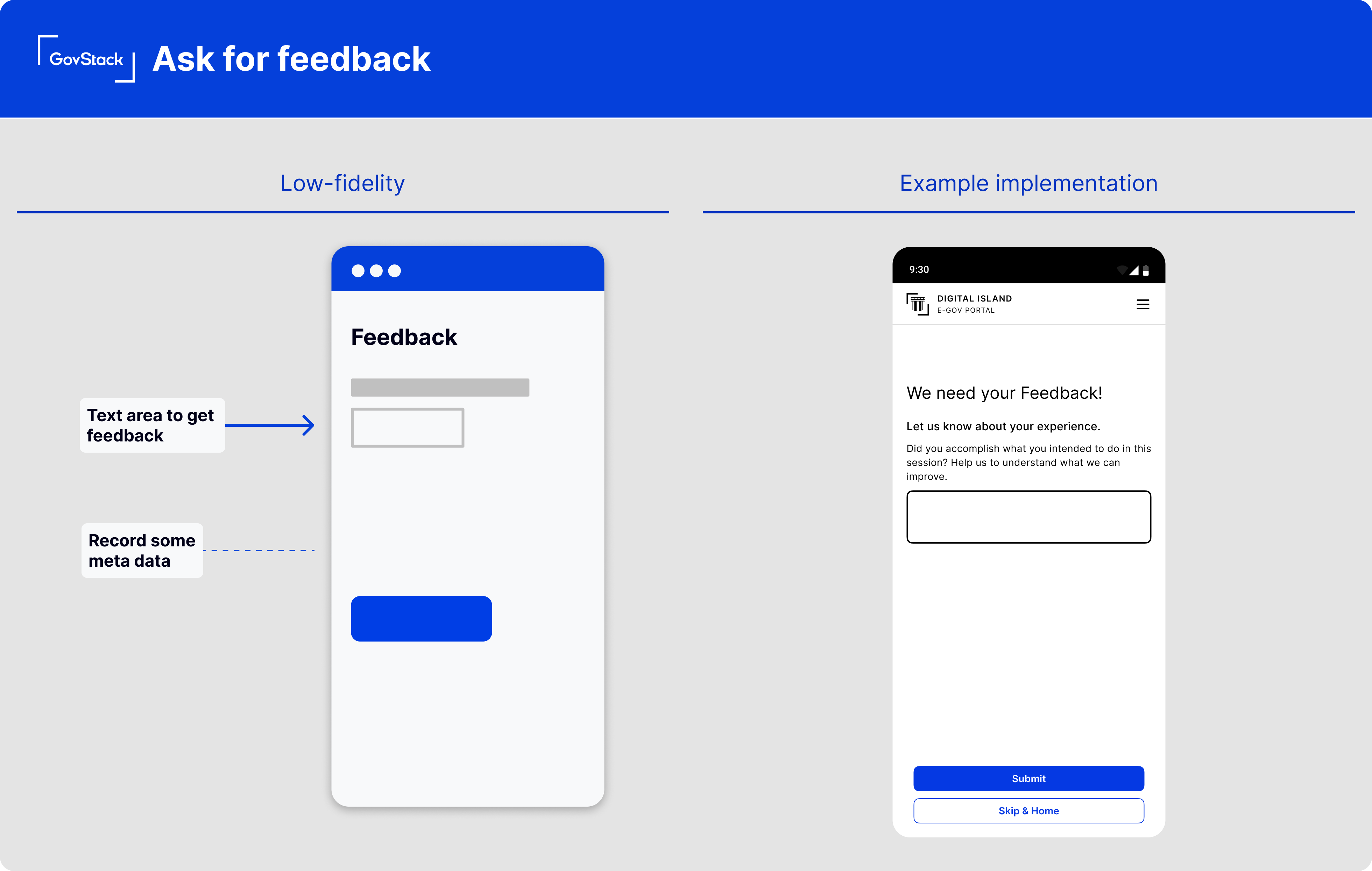
Provide a page with simple text area where users can input their thoughts and experiences. Feedback can be optional or required depending on the context.
#### What to include
**Page heading**
Use a clear title that indicates the purpose of the step is to collect feedback.
Use a neutral, non-judgmental title that does not not imply that providing feedback is mandatory unless it is required.
**Feedback question and field**
Clearly state what feedback you're asking for and why. Limit the scope of the question to the current page, step, or overall experience.
Use hint text to guide users on the type of feedback that is useful. Avoid collecting personal or sensitive information, and where appropriate remind users not to share it.
**Primary action button**
Include a clear call to action button for submitting feedback. Example ‘Submit feedback’.
**Success message**
After users submit their feedback, display a success message to let them know it was received successfully.
Make it clear what happens next, including whether the user will return to the service or can continue their journey.
Use [outcome](/service-patterns/3.-step-patterns/outcome.md) page if needed.
#### Meta data you might collect
**Device Information**
This includes data like the user's operating system, browser type, and screen resolution, which can be helpful for troubleshooting technical issues.
**Timestamp** **and session ID**
Recording the time and date of the feedback can help identify issues that occur at specific times.
If your system uses session IDs, collecting this can help you associate the feedback with a particular user session.
## Prompt for feedback
Collect feedback while users are completing a service, without interrupting or distracting user’s progress.
This could be a dedicated page with a [feedback form](#feedback-form) that opens in a new tab or a modal within the page at relevant points in the user journey.
Where feedback is collected during a service, return the user to the same point in the journey after submitting or dismissing the feedback.
#### **How it works**
* Trigger the feedback prompt from a link or button without interrupting the user's progress
* Provide a simple free-text input where users can input their thoughts and experiences.
* Capture metadata about the page or step such as page URL or session ID.
## Satisfaction questions at the end of a service
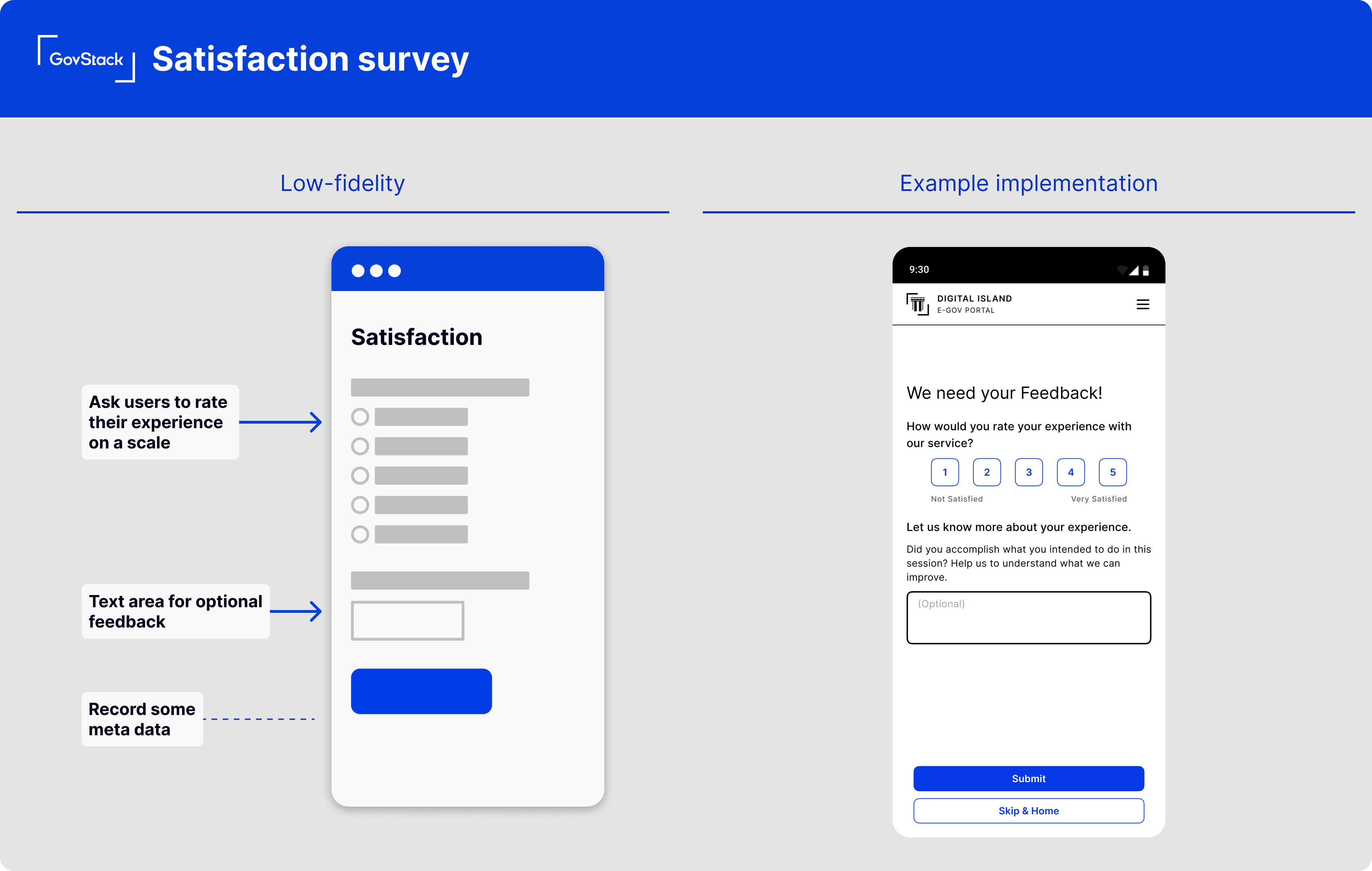
After the user has completed the main service outcome or at the end point of the user journey, prompt users to rate their experience.
This should be a simple rating scale (1-5) or a binary satisfied/dissatisfied question.
#### How it works
**Open-ended Feedback**
Following the rating, provide an optional text field for users to share more details about their experience. Prompt users with an open-ended question like, "How could we improve your experience?"
**Submit Button**
Include a clear 'submit' button to finalise their feedback.
**Success Message**
Display a success message after submission, thanking them for their feedback.
#### **Data you might Collect**
* **Page URL:** The URL of the page from which the feedback was submitted.
* **Session ID:** Identifies the particular user session, for associating feedback with specific user journeys.
---
# Agent Instructions
This documentation is published with GitBook. GitBook is the documentation platform designed so that both humans and AI agents can read, navigate, and reason over technical content effectively. Learn more at gitbook.com.
## Querying This Documentation
If you need additional information that is not directly available in this page, you can query the documentation dynamically by asking a question.
Perform an HTTP GET request on the current page URL with the `ask` query parameter, and the optional `goal` query parameter:
```
GET https://specs.govstack.global/service-patterns/3.-step-patterns/ask-for-feedback.md?ask=&goal=
```
`ask` is the immediate question: it should be specific, self-contained, and written in natural language.
`goal` is optional and describes the broader end goal you are ultimately trying to accomplish on behalf of the user. GitBook uses it to tailor the answer towards what is most useful for that goal.
The response will contain a direct answer to the question and relevant excerpts and sources from the documentation.
Use this mechanism when the answer is not explicitly present in the current page, you need clarification or additional context, or you want to retrieve related documentation sections.