> For the complete documentation index, see [llms.txt](https://specs.govstack.global/llms.txt). Markdown versions of documentation pages are available by appending `.md` to page URLs; this page is available as [Markdown](https://specs.govstack.global/service-patterns/3.-step-patterns/ask-a-question.md).
# Ask a question
Ask questions to collect needed information from users in a clear, minimal, and respectful way.
Users need to provide accurate answers without confusion, repetition, or unnecessary effort.
#### Use this pattern when:
* a service needs information directly from the user or organisation to make a decision, complete a transaction, or personalise the service.
* information cannot be obtained from integrations or [matching data from existing systems or trusted sources](/service-patterns/3.-step-patterns/matching.md).
Follow a [question protocol](https://www.uxmatters.com/mt/archives/2010/06/the-question-protocol-how-to-make-sure-every-form-field-is-necessary.php) to identify what information you really need. Be clear about why you are asking and how the information will be used.
Check whether you need [consent](/service-patterns/2.-functional-patterns/ask-for-consent.md) to collect or use the information.
#### When not to use:
Do not use this pattern when:
* The information is already available from existing government systems or integrations
* The data can be pre-filled and only needs user confirmation and consent
* Asking the question does not add value to the service outcome
* The request is optional or “nice to have” rather than necessary
***
## How it works
### Content to include
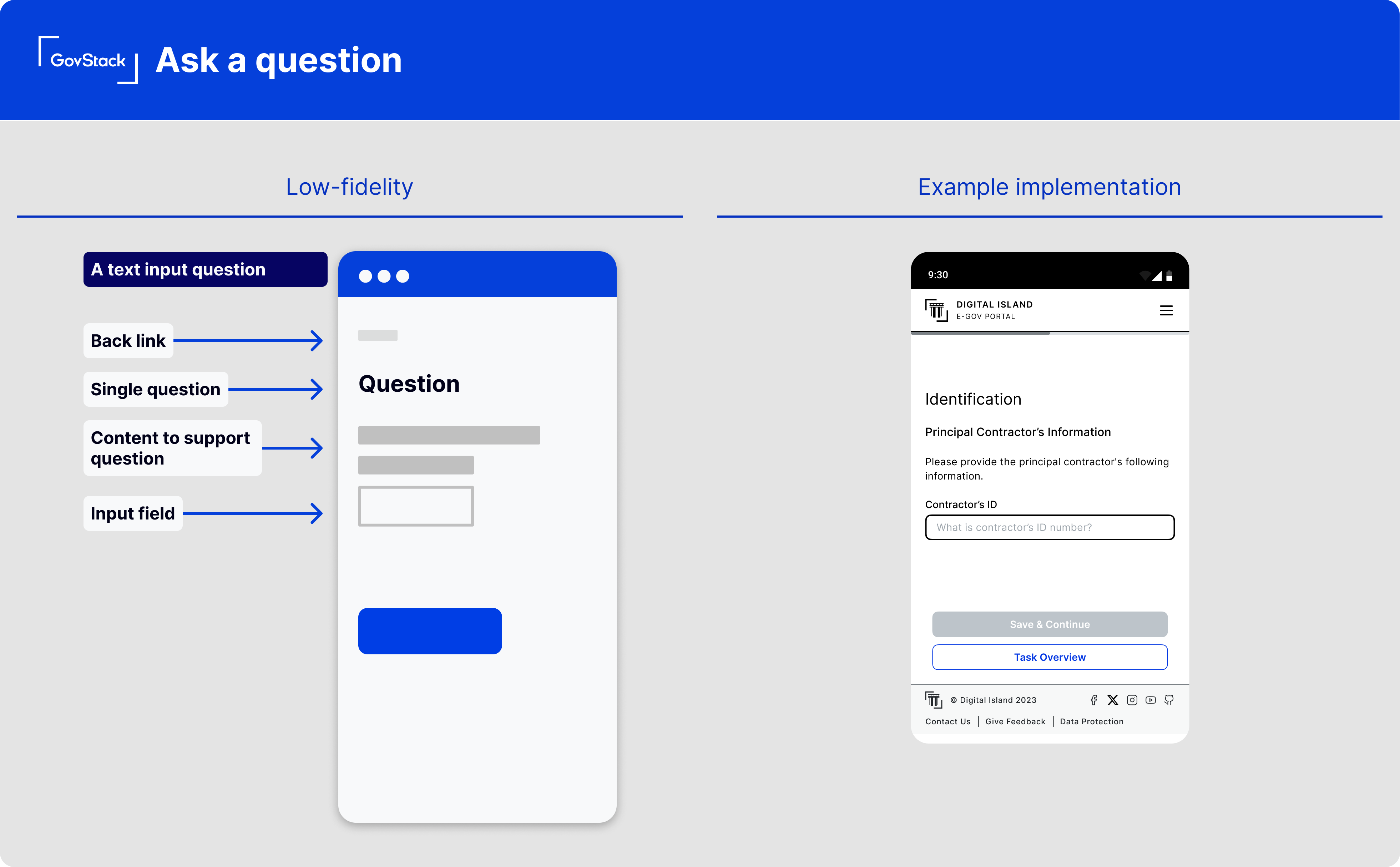
**Question or question heading**\
Ask a clear question in plain language. Ask for one thing at a time. This helps users focus on one specific thing without being overwhelmed
**Hint text**\
Use hint text to explain to users how to answer the question. Provide short instructions or examples. Show the expected format where needed.
**Question field**
Use the field type that matches the information being requested.
Use questions fields such as:
* Text fields for written answers
* Number fields for numeric values
* Date fields with the required format
* Radio buttons when only one option can be selected
* Checkboxes when multiple options can be selected
* Dropdown lists when the list of options is long such as when choosing a country
* File upload fields for documents or evidence
**Error messages**\
Error messages must explain what is wrong and how to fix it.
**Optional questions**\
If a question is optional, add 'optional' to the question text. Do not mark mandatory questions with asterisks (\*), as this is not accessible.
### User interaction
**Save and return**
Enable users to save progress and return when questions are many, complex or involves sensitive information. Allow users to save partial answers and return later.
[Authentication](/service-patterns/2.-functional-patterns/authenticate.md) is required to protect saved information.
**Progress indication**
Show progress when there are multiple questions or pages. Help users understand how far they are through the process without revealing unnecessary detail.
## **Variants**
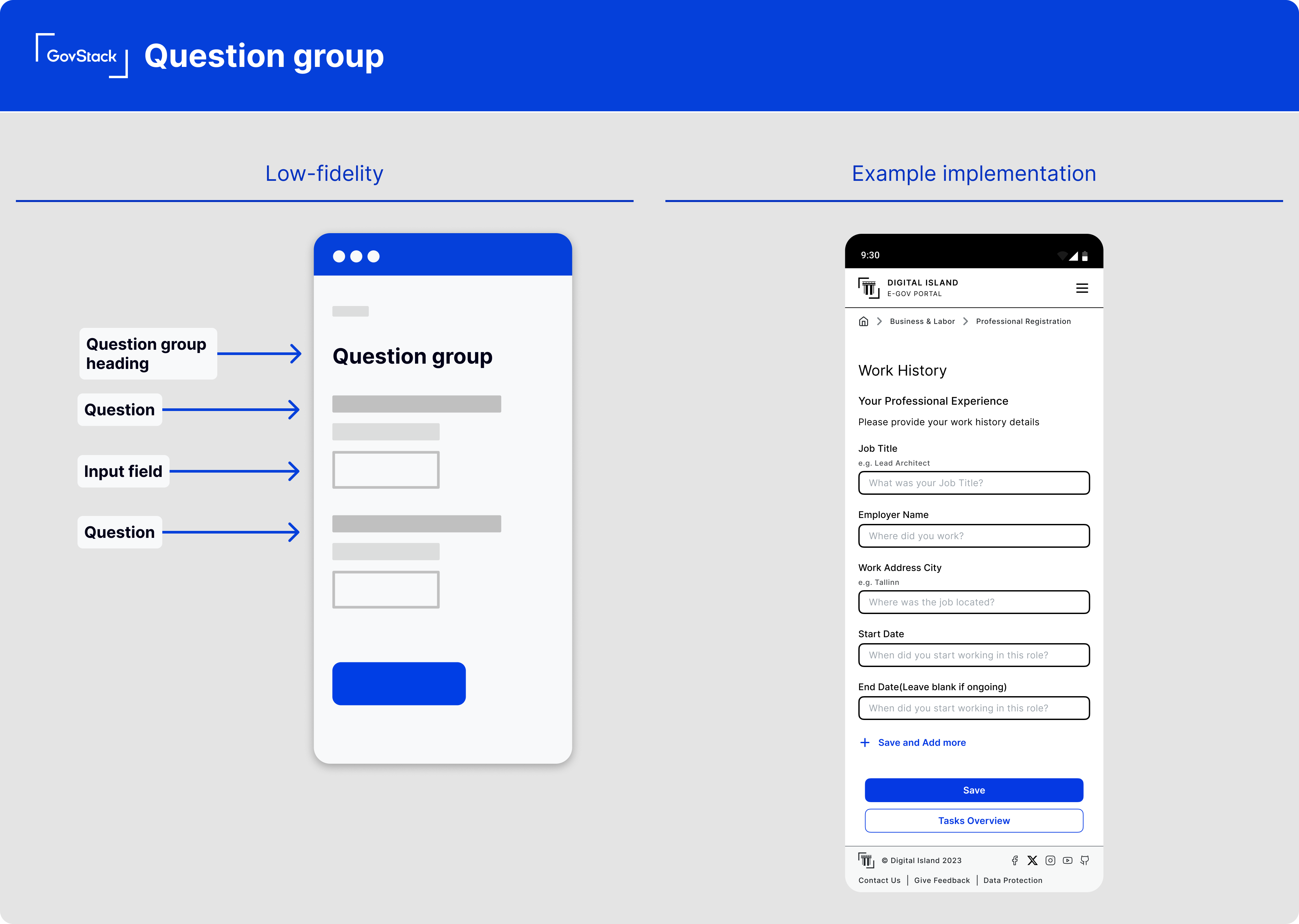
### Question group
**When to use**
Use a question group to collect related information together, such as contact details. Grouping helps users understand context and provide accurate answers.
Use a clear question heading for the question group that tells users what the group is about.
### Branching
**When to use**
Use branching when the answers to some questions determine which questions are shown next. Branching helps avoid asking users questions they do not need to answer. irrelevant questions.
With branching and logic:
* Follow-up questions appear only when they are relevant to the user’s previous answers.
* Users see only the questions they need to answer.
Ensures follow-up questions are only shown when they are relevant to the user’s previous answers.
**Example**\
A benefits service asks if a user has a partner. If the answer is “Yes,” additional questions about the partner’s income are shown. If “No,” those questions are skipped.
\
---
# Agent Instructions
This documentation is published with GitBook. GitBook is the documentation platform designed so that both humans and AI agents can read, navigate, and reason over technical content effectively. Learn more at gitbook.com.
## Querying This Documentation
If you need additional information that is not directly available in this page, you can query the documentation dynamically by asking a question.
Perform an HTTP GET request on the current page URL with the `ask` query parameter, and the optional `goal` query parameter:
```
GET https://specs.govstack.global/service-patterns/3.-step-patterns/ask-a-question.md?ask=&goal=
```
`ask` is the immediate question: it should be specific, self-contained, and written in natural language.
`goal` is optional and describes the broader end goal you are ultimately trying to accomplish on behalf of the user. GitBook uses it to tailor the answer towards what is most useful for that goal.
The response will contain a direct answer to the question and relevant excerpts and sources from the documentation.
Use this mechanism when the answer is not explicitly present in the current page, you need clarification or additional context, or you want to retrieve related documentation sections.