> For the complete documentation index, see [llms.txt](https://specs.govstack.global/llms.txt). Markdown versions of documentation pages are available by appending `.md` to page URLs; this page is available as [Markdown](https://specs.govstack.global/service-patterns/2.-functional-patterns/present-a-credential.md).
# Present a credential
Prove something to a service, organisation or authority by presenting an existing credential (or equivalent proof), with clear consent and a reliable outcome.
Use this pattern when a service:
* needs proof of identity, status, eligibility, or entitlement
* currently requests documents or certificates
* wants to reduce repeated document requests and revalidation
## Steps
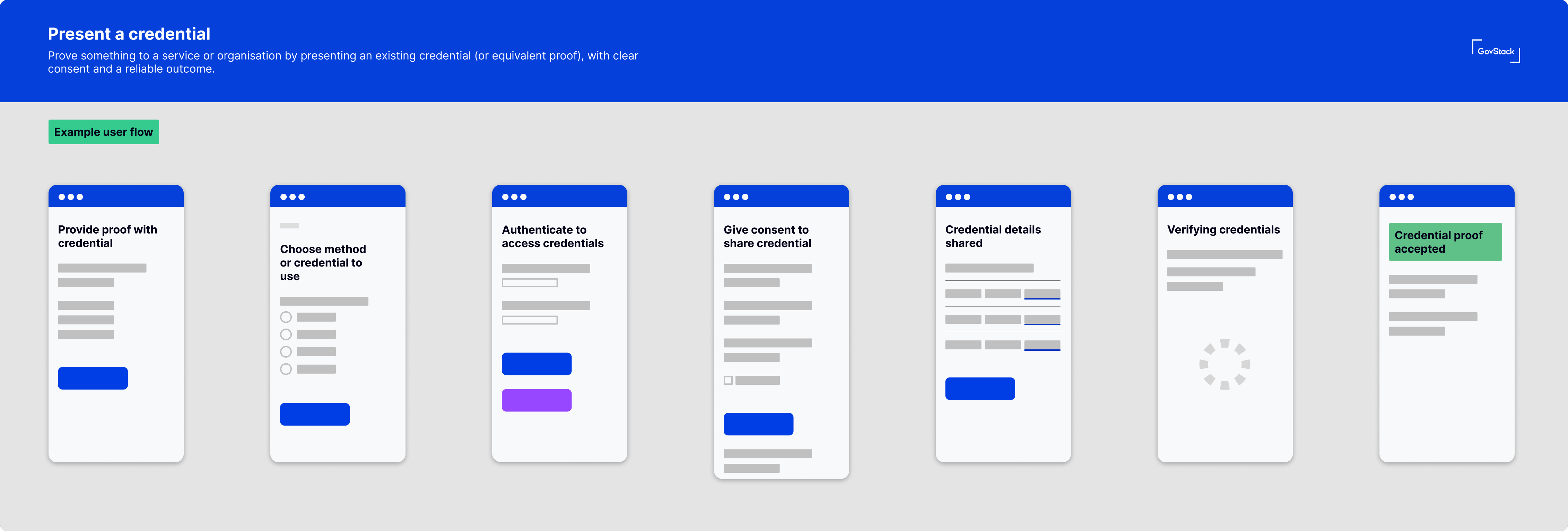
{% @mermaid/diagram content="---
config:
theme: redux
layout: dagre
-------------
flowchart LR
A\["1. Service requests proof "] --> B\["2. Choose how to proceed "]
B --> C{"Which route?"}
C -- Use wallet --> W1\["3. Select credential "]
W1 --> W2\["4. Give consent to share "]
W2 --> W3\["5. Present proof "]
W3 --> F\["6. See outcome and return to service "]
C -- Paper / assisted --> P1\["3. Provide proof (paper/assisted) "]
P1 --> F
C -- "Reference (on-site)" --> R1\["3. Enter reference "]
R1 --> R2\["4. Match to record "]
R2 --> R3\["5. Generate representation "]
R3 --> R4\["6. Present proof "]
R4 --> F
A@{ shape: rounded}
B@{ shape: rounded}
W1@{ shape: rounded}
W2@{ shape: rounded}
W3@{ shape: rounded}
F@{ shape: rounded}
P1@{ shape: rounded}
R1@{ shape: rounded}
R2@{ shape: rounded}
R3@{ shape: rounded}
R4@{ shape: rounded}" %}
Example user flow
### 1. Understand the proof request
The service explains what needs to be proven and why, using plain language.
Make clear:
* what is being proven e.g. identity, age, residency, vaccination status
* why it is needed at this point
* what will happen after proof is accepted or rejected
The service may allow users to generate or retrieve a usable proof on-site, for example by entering a reference number to print a QR code, where this is appropriate.
If the service needs to link the user to a credential first, [authenticate](/service-patterns/2.-functional-patterns/authenticate.md) the user or [match](/service-patterns/3.-step-patterns/matching.md) via reference.
If personal data will be shared, [ask for consent](/service-patterns/2.-functional-patterns/ask-for-consent.md) before the transfer.
### 2. Choose how to proceed
The user chooses a method to provide proof such as digital wallet, paper, card or QR code.
Make clear:
* the supported routes to present the credential
* the effort and time taken by each method
* what to do if they can’t use the preferred route for example, if no smartphone or low connectivity
Use [multiple choice question](/service-patterns/3.-step-patterns/ask-a-question.md#variants) to present options to user.
Some services support on-site generation of proof (for example, entering a reference number at reception or kiosk to print a QR code). This can help users who do not have a smartphone, have low connectivity, or did not bring their credential.
This route typically involves:
* entering a reference number (or similar identifier)
* matching to an existing record
* generating a time-bound or context-specific representation (e.g. printed QR)
### 3. Select the credential (or source of proof)
If using a wallet, the user selects which credential to present, use a [multiple choice question](/service-patterns/3.-step-patterns/ask-a-question.md#variants).
Make clear:
* which credential(s) are suitable for this request
* whether an existing credential can be reused
* how to switch route if none are suitable
Design guidance
* minimise decision fatigue
* do not expect users to understand issuer ecosystems
### 4. Give consent to share
The user reviews what information will be shared, who it will be shared with, and agrees to proceed.
Make it clear:
* who is requesting the information (verifier)
* what will be shared
* purpose of sharing
* user’s ability to refuse and alternatives available
Use the [consent pattern](/service-patterns/2.-functional-patterns/ask-for-consent.md).
### 5. Present proof
Proof is presented to the relying party via the chosen route.
Examples of presentation mechanisms:
* digital wallet presentation
* QR or code shown to staff or device
* reference number used for lookup
* paper certificate presented or submitted
* assisted verification where staff checks records
### 6. See the outcome and return to the service
The user sees whether proof was accepted, not accepted or if more information is needed.
Tell the user what happens next, how to try again or choose another route if failed.
Use the [outcome step](/service-patterns/3.-step-patterns/outcome.md).
***
## Considerations
* User consent is essential. Presenting proof must feel like an informed choice, not a hidden data transfer.
* Offer paper or assisted routes where digital is not possible or appropriate.
* Support offline presentation where feasible; avoid making connectivity a hard dependency.
* Consider scenarios where a user may be required to present proof on behalf of someone else and define acceptable routes. For example, a parent, carer, accountant.
* If presentation fof proof fails, do not leave users to a dead end instead enable retrying, alternative proof, or assisted support.
---
# Agent Instructions
This documentation is published with GitBook. GitBook is the documentation platform designed so that both humans and AI agents can read, navigate, and reason over technical content effectively. Learn more at gitbook.com.
## Querying This Documentation
If you need additional information that is not directly available in this page, you can query the documentation by asking a question.
Perform an HTTP GET request on the following URL with the `ask` and `goal` query parameters:
```
GET https://specs.govstack.global/service-patterns/2.-functional-patterns/present-a-credential.md?ask=&goal=
```
`ask` is the immediate question: it should be specific, self-contained, and written in natural language.
`goal` is what the user is ultimately trying to achieve, the reason they need the answer. Sharing it helps GitBook give you a better, more relevant answer. A goal is most helpful when it describes the outcome the user wants rather than restating the question. For example, with `ask=how do I create an API token`, a goal like `automate deployments from our CI pipeline` lets GitBook tailor the answer to that use case.
The response will contain a direct answer to the question and relevant excerpts and sources from the documentation.
Use this mechanism when the answer is not explicitly present in the current page, you need clarification or additional context, or you want to retrieve related documentation sections.