> For the complete documentation index, see [llms.txt](https://specs.govstack.global/llms.txt). Markdown versions of documentation pages are available by appending `.md` to page URLs; this page is available as [Markdown](https://specs.govstack.global/service-patterns/2.-functional-patterns/check-eligibility.md).
# Check eligibility
Use this pattern to check if users qualify for a service, without having to go through a full application process or manual approval. Early eligibility checks reduces user drop-off later in the journey.
**Use this pattern when:**
* eligibility rules exist and not all users will qualify.
* eligibility can be determined through questions, rules, or trusted data sources.
* services have multiple eligibility variants with different criteria.
**Do not use if:**
* all users are eligible by default.
* eligibility can only be confirmed after full submission and assessment, or formal, legally binding decision
## Steps
### 1. Explain eligibility requirements
Users need to understand what the eligibility check involves and what information may be needed.
Include eligibility details on the service sheet or before you start page.
### 2. Check eligibility
#### **Collect eligibility information**
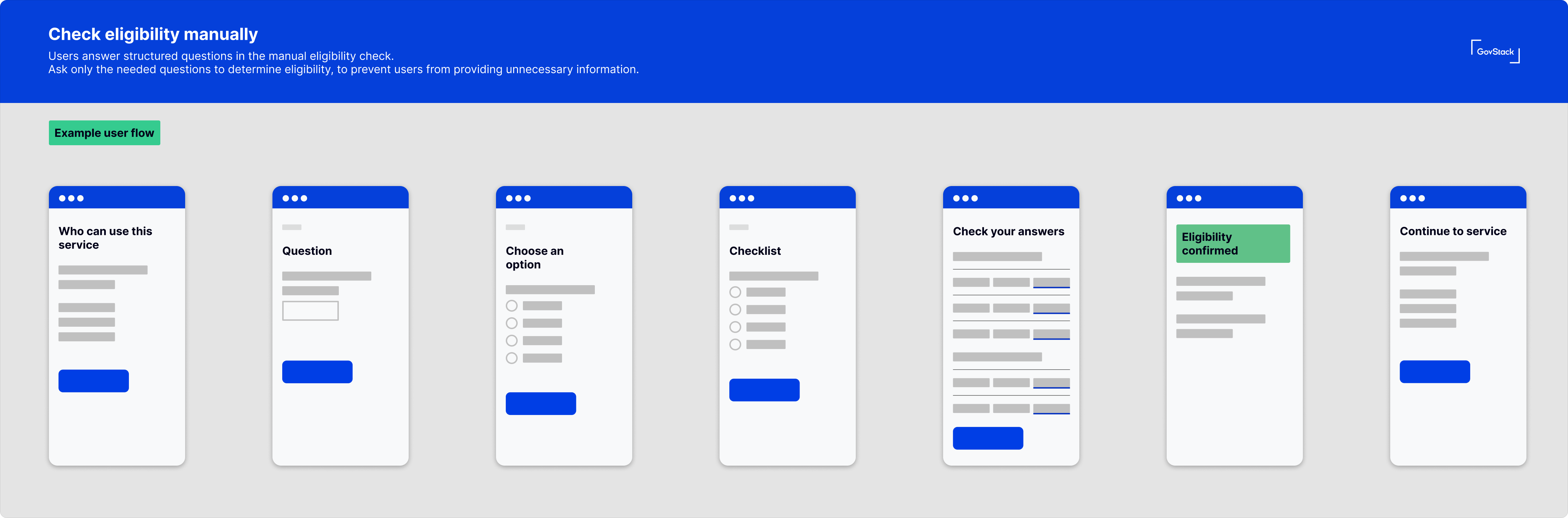
Users answer structured questions in the manual eligibility check.
Ask only the needed questions to determine eligibility, to prevent users from providing unnecessary information.
Use branching questions if some questions don't apply to all users based on their circumstances.
{% @mermaid/diagram content="---
config:
theme: redux
layout: dagre
-------------
flowchart LR
B\["Explain eligibility criteria"] --> n7\["Present eligibility checklist"] & n8\["Ask eligibility questions"]
n4\["Outcome"] --> n3@{ label: "\\User is eligible" } & n2\["User not eligible"] & n1\["Eligibility cannot be determined"]
n8 --> n12\["If branching question"]
C\["Check eligibility"] --> n4
n3 --> n9\["Continue to service"]
n2 --> n10\["Explain what happens next or provide other options"]
n1 --> n10
n11\["Check and confirm answers"] --> C
n7 --> n11
n12 --> n13\["Question"] & n14\["Question"]
n13 --> n11
n14 --> n15\["Question"]
n15 --> n11
B@{ shape: rect}
n3@{ shape: rect}
C@{ shape: diam}
" %}
Example user flow
**Review answers**
Allow users to review and change their answers before submitting for the eligibility assessment. Use the [check answers step](/service-patterns/3.-step-patterns/check-answers.md).
#### **Automatic eligibility check**
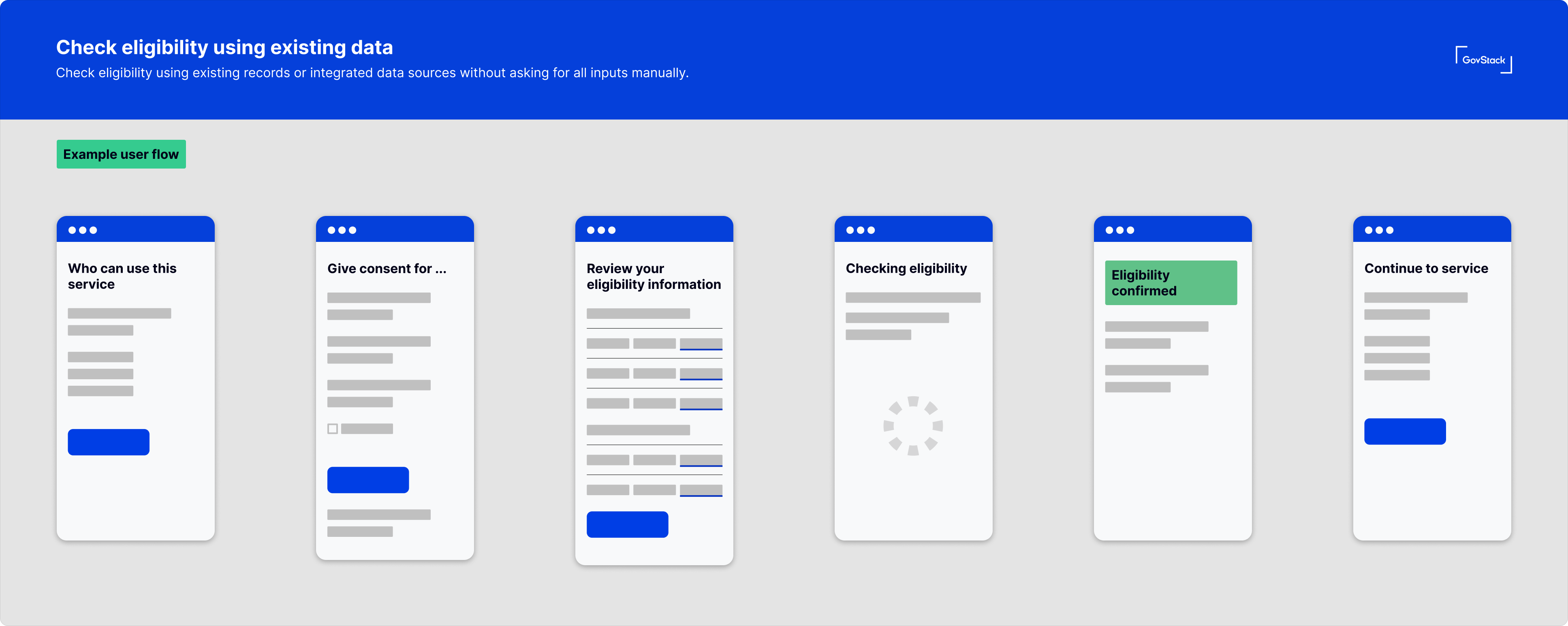
Check eligibility using existing records or integrated data sources without asking for all inputs manually.
{% @mermaid/diagram content="---
config:
theme: redux
layout: dagre
-------------
flowchart LR
B\["Explain eligibility criteria, data use and source"] --> n7\["Ask for consent to use data for eligibility check"]
n4\["Retrieve data automatically"] -- Data available --> n3@{ label: "\\Present data for user review, confirmation or amends" }
n4 -- Data not available --> n2\["Provide another eligibility method"]
C\["Consent given?"] -- Yes --> n4
n3 -- Incorrect data --> n9\["Proceed to amend data on"]
n1\["Eligibility cannot be determined"] --> n10\["Explain what happens next or provide other options"]
n7 --> C
n13\["Assess eligibility automatically"] --> n14\["Not eligible"] & n1 & n15\["Eligible"]
n14 --> n10
C -- No --> n2
n3 -- Data confirmed --> n13
n9 --> n13
n15 --> n16\["Continue to service"]
B@{ shape: rounded}
n7@{ shape: rounded}
n4@{ shape: rounded}
n3@{ shape: rounded}
n2@{ shape: rounded}
C@{ shape: diam}
n9@{ shape: rounded}
n1@{ shape: rounded}
n10@{ shape: rounded}
n13@{ shape: diam}" %}
Example user flow
Automatic eligibility assessment can be made using:
* data the user provides during the journey
* data the service already has
* data retrieved from trusted external sources
* credentials the user presents
* rules or logic applied automatically
Authentication is often required to link data to the right user. Explain what data is used and obtain users consent to access or share their personal
You may need to use functional patterns for [authentication](/service-patterns/2.-functional-patterns/authenticate.md), [presenting a credential](/service-patterns/2.-functional-patterns/present-a-credential.md) and [consent](/service-patterns/2.-functional-patterns/ask-for-consent.md) where personal data is accessed or shared.
### 3. Show outcome
Clearly state the outcome of an eligibility check. Tell users if they are eligible, not eligible, or if eligibility cannot be determined. Explain the reason and next steps on the [outcome page](/service-patterns/3.-step-patterns/outcome.md)
**Tell users what happens next based on their outcome**
* Eligible users continue to use the service.
* Ineligible users are directed to alternatives, guidance or support. For example, let users schedule an appointment for an in person eligibility check.
* Users with unclear outcomes are told what information is missing or incorrect and what to do next.
* If the purpose of the service is to provide reusable proof of eligibility, then you can issue a credential.
***
## Considerations
**Data minimisation**
Collect only information needed to reach an eligibility decision.
**Eligibility rules should be transparent**
Make eligibility rules clear and consistent across channels. Users should understand why an outcome was reached.
**Support outcomes beyond yes or no**.
Support partial, conditional, and time-limited eligibility. Avoid forcing a yes or no outcome where it does not apply.
**Design for uncertainty or missing data**
Provide a clear outcome when eligibility cannot be determined due to missing, conflicting, or unverifiable data.
Explain what information is missing or cannot be verified and support the user to a solution..
**Keep eligibility consistency across channels**\
Apply the same eligibility rules in digital, assisted, and offline channels.
\
---
# Agent Instructions
This documentation is published with GitBook. GitBook is the documentation platform designed so that both humans and AI agents can read, navigate, and reason over technical content effectively. Learn more at gitbook.com.
## Querying This Documentation
If you need additional information that is not directly available in this page, you can query the documentation by asking a question.
Perform an HTTP GET request on the following URL with the `ask` and `goal` query parameters:
```
GET https://specs.govstack.global/service-patterns/2.-functional-patterns/check-eligibility.md?ask=&goal=
```
`ask` is the immediate question: it should be specific, self-contained, and written in natural language.
`goal` is what the user is ultimately trying to achieve, the reason they need the answer. Sharing it helps GitBook give you a better, more relevant answer. A goal is most helpful when it describes the outcome the user wants rather than restating the question. For example, with `ask=how do I create an API token`, a goal like `automate deployments from our CI pipeline` lets GitBook tailor the answer to that use case.
The response will contain a direct answer to the question and relevant excerpts and sources from the documentation.
Use this mechanism when the answer is not explicitly present in the current page, you need clarification or additional context, or you want to retrieve related documentation sections.