> For the complete documentation index, see [llms.txt](https://specs.govstack.global/llms.txt). Markdown versions of documentation pages are available by appending `.md` to page URLs; this page is available as [Markdown](https://specs.govstack.global/implementation-playbook/1.0.1/implementation/design-architecture/5-start-with-the-system-context.md).
# 5 Start with the System Context
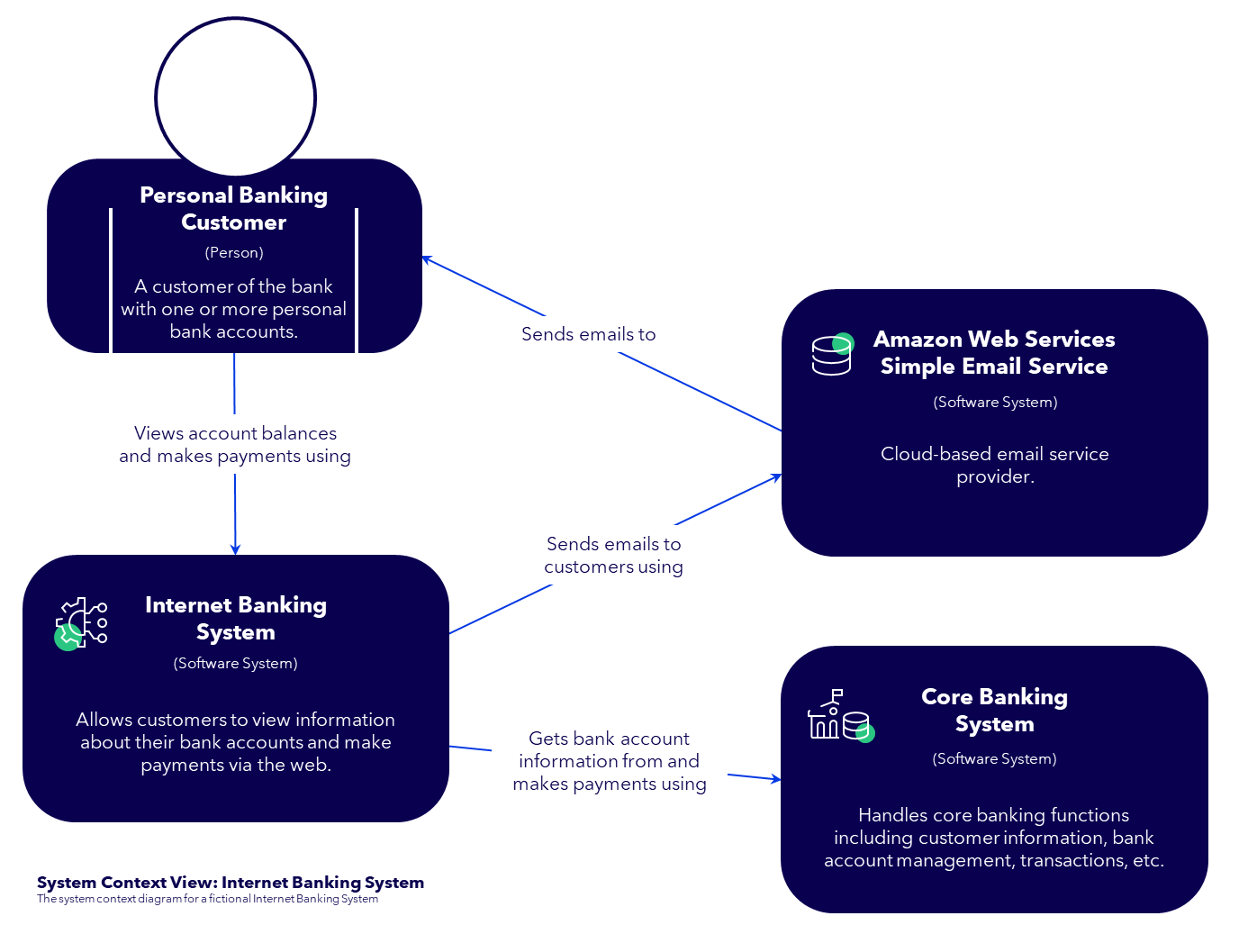
It is always advisable to start with the system context, as it provides a good first overview of how technical requirements emerge from the functional requirements. The system context defines the boundaries of the solution, the actors who interact with it, and the external systems and building blocks on which it depends.
Having the system context early already informs you about many of the components that will appear later in step [5-B.3 Create Component Diagram](/implementation-playbook/1.0.1/implementation/design-architecture/5-b.3-create-component-diagram.md).
## System Context Diagram
Adapted from https://c4model.com (CC BY 4.0). Changes made.
## How to do it
### Identify users & actors
Understanding who interacts with the system and how is the foundation of the system context. Identify all user types, their responsibilities, and their interaction channels.
* Identify all types of users, like
* end users, power users,
* back‑office staff, support users
* administrators and supervisors
* external partners or agents
* technical users, system users
* Understand roles & privileges
* required roles, permissions, and access levels
* separation of duties (e.g., requester vs approver)
* needs for authentication, authorization, or delegated access
* Identify interaction channels
* Check whether different user groups require different channels or frontends. For example:
* A citizen uses a mobile or web interface
* A case worker uses an internal operational interface
* An administrator uses a monitoring or configuration interface
* Users do not always interact through a typical UI. Consider:
* API calls from partner systems
* File uploads (documents, spreadsheets, scanned forms)
* Batch jobs or scheduled tasks
* Emails or text & chat messages triggering processes
### Identify external systems
Identify all external systems your service needs to interact with and understand the flow of information between all systems and actors. This includes the data formats and communication technologies being used (like REST + JSON). The system being designed might only be a single step in a series of steps.
### Identify external GovStack Building Blocks
When documenting this, identify what "external" building blocks can be introduced as part of the solution (IAM, Messaging, Payment, Information Mediator, ...). A first step would be to check if any proposals/ recommendations have been made during the service design phase. You should aim to reuse & share existing instances of those building blocks when possible.
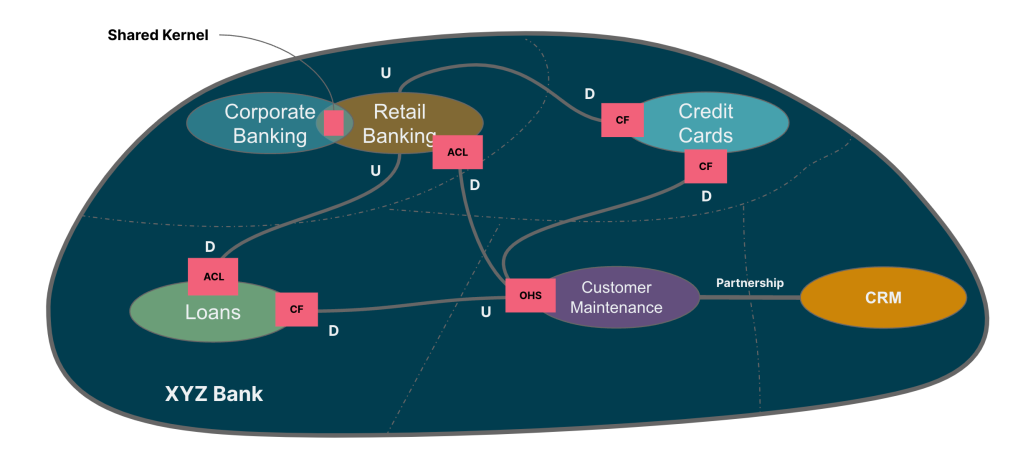
Another source to check for potential building blocks is the context map, if available. If the context map contains "generic contexts", this generally means that there should be a building block offering this functionality.
**Example Domain-Driven Design (DDD) Context Map**
Simplified context map for a fictitious XYZ bank (DDD Practitioners, n.d.)
*For readers unfamiliar with context mapping in Domain-Driven Design, additional background information is available at the following reference:* [*https://ddd-practitioners.com/home/glossary/context-map/*](https://ddd-practitioners.com/home/glossary/context-map/)
## Next Step: System Landscape or System Architecture
After completing this step, you need to decide whether you want to continue with the System Landscape, for an overview or with the System Architecture, for getting into the details of the technical design.
{% columns %}
{% column %}
{% content-ref url="/pages/dUB2ElDeygtWiqfveu94" %}
[5-A System Landscape](/implementation-playbook/1.0.1/implementation/design-architecture/5-a-system-landscape.md)
{% endcontent-ref %}
{% endcolumn %}
{% column %}
{% content-ref url="/pages/ZXz5BT6fPHOjLgsBmimq" %}
[5-B System Architecture](/implementation-playbook/1.0.1/implementation/design-architecture/5-b-system-architecture.md)
{% endcontent-ref %}
{% endcolumn %}
{% endcolumns %}
---
# Agent Instructions
This documentation is published with GitBook. GitBook is the documentation platform designed so that both humans and AI agents can read, navigate, and reason over technical content effectively. Learn more at gitbook.com.
## Querying This Documentation
If you need additional information that is not directly available in this page, you can query the documentation by asking a question.
Perform an HTTP GET request on the following URL with the `ask` and `goal` query parameters:
```
GET https://specs.govstack.global/implementation-playbook/1.0.1/implementation/design-architecture/5-start-with-the-system-context.md?ask=&goal=
```
`ask` is the immediate question: it should be specific, self-contained, and written in natural language.
`goal` is what the user is ultimately trying to achieve, the reason they need the answer. Sharing it helps GitBook give you a better, more relevant answer. A goal is most helpful when it describes the outcome the user wants rather than restating the question. For example, with `ask=how do I create an API token`, a goal like `automate deployments from our CI pipeline` lets GitBook tailor the answer to that use case.
The response will contain a direct answer to the question and relevant excerpts and sources from the documentation.
Use this mechanism when the answer is not explicitly present in the current page, you need clarification or additional context, or you want to retrieve related documentation sections.